Well, it's been a little while with no updates. I have been overly busy with work the past week and have not had time to do proper work ups on my presets. I don't want to just post one for download with a picture. I like to give a little info and my thoughts on each one. Lately time has been a little tight, but it should ease up as the week progresses.
Also, my stock of preset releases was getting slim. I have a list of presets to do, currently 50+ that I have enough info and samples to work with. However one's ready to release were getting slim. In the next few days I will be releasing more, hopefully one a day again, but I may back off to one every other day, and fill off days with other material I would like to cover here. Either way, I plan on daily updates, ongoing, starting this weekend. I hope to get at least two more update out this week.
Upcoming presets:
B&W:
Ilford Delta
Ilford FP4+
Ilford HP5+
Ilford Ortho+
Ilford Pan F+
Ilford XPS 2
Ilford SFX
Konica IR
Adox CHS 50
Kodak Panatomic X
Color:
Kodak Gold 100
Kodak Gold 200
Lately my releases have been just emulating film stock, since it has been focusing on B&W. Most of the tone and contrast is very similar between different speeds from my observation, ISO primarily effects grain and contrast, both easily altered to get desired look. On my first B&W release I attempted to differentiate by speed, but I was primarily mucking with sharpening and noise reduction to artificially enhance camera noise. I decided that that is a bad idea and that grain is better reproduced in Photoshop, at least until Adobe decides to give me grain control in Lightroom!
However I am going to handle color films differently. I I can decide that I see no discernible difference in color and tone between ISO's, then I will release just the emulsion, just like my current B&W's. However, if there is a difference in color, tone and curve between different speeds, then I will release a version for each ISO. This is what will occur when I release my Kodak Gold Presets.
I hope you all have been enjoying my work so far, I assure you that more is to come. I work my day job for a major package delivery service and my days are getting longer as we head into the holiday season, not to mention more photography jobs coming into Christmas. It caught up with me this week and I plan to change my blogging and preset release habits to work them into this schedule.
Well until later,
Micahel
20081118

20081113
LR/ACR Preset: Kodak HIE

[Adobe Camera RAW presets added 01132009]
Sorry for the missed day all...I had to take it off, it was my first day in a very long time in which I developed my own film. Processed a roll of my favorite, Fuji Neopan 100 Acros. But anyways, that was the cause of the delay...photography.
But today I preset to you my humble interpretation of Kodak HIE infrared film. This particular film stock is no longer produced (production ceased in 2007) and the last rolls of stock are selling at quite high prices on eBay. I'm too cheap to pay $40 usd on a roll of film, no matter how spectacular, so this was as close as I could get with out real negatives in my hand to compare to.
Anyways, many people were up in arms of the cancellation of this film, so I guess it was special to many people out there. So have at it and hopefully it may get near-IR results.
Get it HERE.
I will recommend that you adjust the red and magenta channels give or take 20 clicks on the slider to find the best look for the image. I kept the reds conservative to get better overall appearance, but many photos need those channels kicked to the right a notch to get better IR effect.
Well until next time,
Michael
20081111
LR/ACR Preset: Kodak T-Max
[Adobe Camera RAW presets added 01132009]
So, my internet connection is back up. It was down all day and I thought I wasn't going to get tonight's release done. Trying to release 5-6 per week, and I have plenty of emulsions to emulate, so they should keep coming for a while. But anyways...
Tonight I bring to the world my rendition of Kodak T-Max. In the interest of honesty, I am not a fan of T-Max. At least not with my experience with the film. I always found it to be lacking in tone and character. But there is a whole world full of people who know more about photography than I who love this film. So even though not a film I love I emulated it anyways, I have shot enough to know somewhat what I was looking for, and hopefully this preset is sufficient.
Get it HERE.
This almost draws my Kodak B&W collection to a close, only have HIE infrared to go (which obviously cannot be emulated without a real IR converted camera, which I don't have access to.) I hope you have found these presets useful.
Also, when you post pictures processed with my presets onto Flickr, if you remember, please tag the photo "lifeindigitalfilm" and with the preset name. I would love to see your work using my presets. By no means do you have to, but I would appreciate it. And to those of you who already have, thank you.
Once again, leave feedback on the presets after you use them. Tell me what you think, what I should improve or do differently. I truly want these presets to be a viable choice for photographer who want the film look without having to get Exposure 2 or DxO Film Pack. The more feedback I get, the more I have to work from when I am ready to revise the presets.
I plan on also re-releasing all my previous presets as ACR settings. So far I am getting good results with the emulations processed with ACR. It's pretty straight-forward, just copy all the LR setting over to ACR, but it is alot of work. So, I will only release ACR presets after I complete each LR pack, not after each preset.
Until Next Time,
Michael W. Gray
20081110
LR/ACR Preset: Kodak Plus-X

Sorry for the time away, but I have been feeling a little under the weather. Good news is that I have some more presets ready, which I will be releasing over the next couple days.
Today I present my interpretation of Kodak Plus-X black and white film. Plus-X is another classic film, it received a revamp back in the 2002, merging the Plus-X family into one emulsion, PX125 (which is still available today). The grain is finer than that of Tri-X and tones are smoother and more subdued than T-max.
You can get it HERE.
When using the preset, any preset by me (or anyone else for that matter) remember to play around with those sliders some. As long as you don't touch the color mixer on my presets you should retain the general tone and/or color of the film. Throw in vignettes, sharpen the hell out of the images, drop the contrast, whatever makes it look right to you.
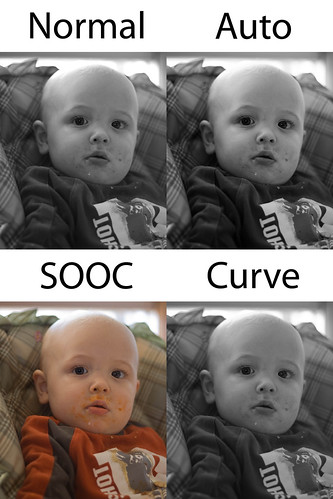
Try the different versions of each preset. Take the standard preset and tweak it to your needs, when you find a look you like, right click on the preset and update it with your new settings. Work the picture up in color and toss the curve preset on it, it will leave all you basic tone adjustments alone. Or let Lightroom do the work and hit the Auto preset. Experiment. If you have any question regarding the use of my presets just ask in the comments under the applicable preset. I will give you an answer as soon as I get a chance.
Well until next time, my friends
Michael W. Gray
PS make sure you check out the sites to the right, such as PresetsHeaven & TWIP.
20081107
LR/ACR Preset: Kodak Tri-X

[Adobe Camera RAW presets added 01132009]
So I have already released this film emulation once in MikeyG!s B&W Film Presets Vol 1. However after getting out my old negs and prints I decided that I had to have been a bit off. After studying the actual film, simulation programs and the tech papers I feel that this is a more accurate representation of the film. This version alters all colors on the grayscale mixer, not just primaries. To me it seems that by working the entire spectrum I am getting much smoother tones, more reminiscent of real Tri-X.
Grab it HERE.
This is a tricky preset to release, especially since this is the de facto king of B&W to many photographers out there. I pray that the world can accept this preset in all its flaws. I may get close, maybe even closer in the future, but I can never emulate any film 100%. The only way to nail the Tri-X look or any other film look is to shoot the film.
Which, although soapboxing here, brings me to a thought I need to bring up. Since I have started my film emulation presets I have gotten alot of good feedback, but I need to address 2 questions/comments that I have gotten in some volume:
1) Why bother? (film is dead)
I bother because film is the heart and soul of photography. There can be a certain sterility to digital images that was rarely seen on good old analog film. That warmth that film provided in tone, contrast and density made photography. If we can put some of that feeling back into our digital work, especially when its needed, it can only improve an image.
2) Why bother? (if you want it to look like film, shoot film)
I do shoot film. Quite a bit. But I find myself with a digital in hand more often than not. I grew up on film, and will shoot film as long as I can (just got some Ilford 400 hp5+ for the weekend). But for clients photos I almost always use digital, unless they request film. Film is my look, and I want it in my work. It may not be 100% accurate, but 90% approximation of the film I want is better than 100% of what I don't want. Quite frankly film is expensive, and I couldn't afford to shoot a wedding on film and make money. I can't get 10 pictures each of 30 poses in an hour with film, and turn a profit on it. Digital + Simulation gives me what I need with little extra overhead, aside from the work developing my presets or money spent on Exposure 2.
From the response in general I have received, from the download numbers I have seen, people like the film presets. I will keep on making and revising these to get ever closer to the impossible 100%. People are using my presets and enjoying my presets. Most importantly I am using my presets, they are making my workflow easier, and others can benefit from my efforts.
Sorry for the rant,
Michael
Subscribe to:
Posts (Atom)